
You open your laptop Monday morning and see it: an email from a good client that just says, “Any update on this?” You know you talked about it on a Zoom call, jotted something in your notebook, replied once in a long email thread, and maybe even mentioned it in Slack. But there’s no single place that shows what you promised, what you’ve done, and what’s still left. So you stall, dig around, and hope you’re not missing anything important.
Direct answer
The fix is to give every client promise one home, with a simple rule: as soon as a commitment is made in email, a meeting, or chat, it’s captured as a clear task in a single system that shows status and next step. Only after that workflow is solid should you bring in a tool like Lindy AI to help pull details from emails and notes into that home automatically, and to remind you when something is due. The workflow comes first; the assistant just keeps it from slipping.
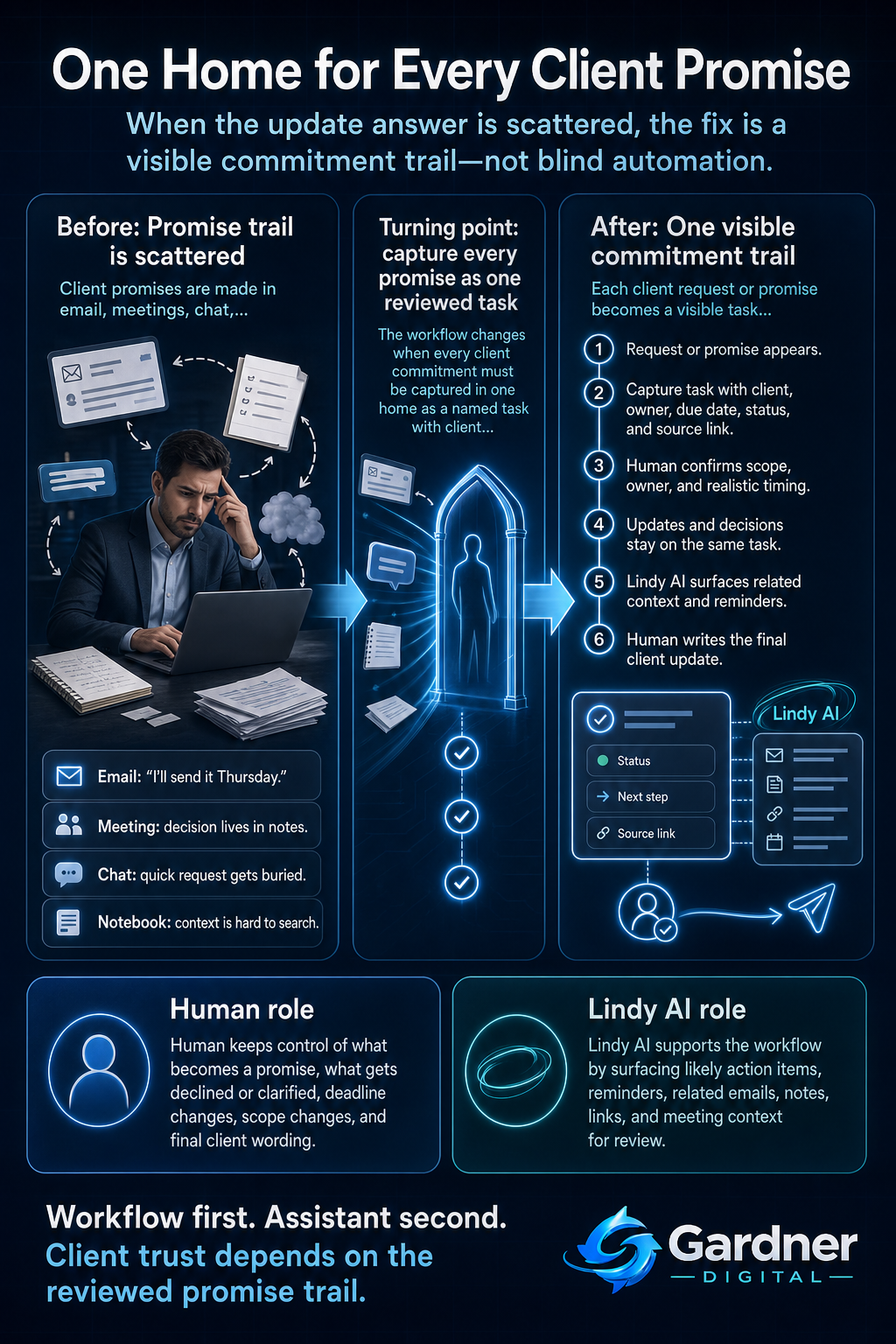
From scattered client requests to one visible promise trail
What this problem looks like
On a normal week, you might promise things in three or four different places: "I’ll send the proposal by Thursday" in an email, "We’ll revise the design" during a Zoom, "I’ll check with my developer" in Slack, and "We’ll add that to the next sprint" scribbled into a notebook during a quick internal huddle.
None of these promises are obviously wrong. The mess shows up later, when a client pings you for an update and you realize the evidence of what you committed is split across Outlook, Google Calendar invites, loose meeting notes, and a half-finished card on your task board. You spend ten minutes searching subject lines, flipping notebook pages, and scrolling Slack instead of replying with a clear, confident status in under a minute.
What changes when every client promise has a single home
Before
- You search three inboxes, your notebook, and Slack to reconstruct what you promised a client last month.
- Replies like “Let me double-check and get back to you” become your default because you are not sure what’s already been done.
After
- Every client email, Zoom decision, and Slack request becomes a named task under that client with a status and next step.
- When a client asks for an update, you open one place and can answer in a couple of sentences, backed by timestamps and notes.
Why the workflow breaks
This problem usually isn’t about laziness or bad intent. It comes from a few predictable gaps:
- No clear capture rule. Promises in email get a star, promises in meetings stay in the notes app, and chat promises just exist in memory. Nothing forces them into one place.
- Missing owner. An action item like “Send revised spreadsheet” floats between you, a contractor, and a teammate. If no name is attached, nobody feels late.
- Weak handoff from conversation to task. The meeting ends, everyone nods, but nothing gets written as a concrete task with a due date and link back to the original message or document.
- No reminder loop. Even if you capture the task, there’s no structured way to review aging promises before the client has to nudge you.
- Scattered context. Details live in attachments, comments in Google Docs, and old email threads, so you hesitate to answer because you can’t see the full picture in one glance.
Step-by-step fix
- Pick one home for client commitments. This might be a task board, CRM pipeline, or even a simple spreadsheet, as long as it’s the single place you and your team use to track promises. Create a column or field for client name, description, status, due date, and link to source (email, doc, or note).
- Set a capture rule for new promises. Decide that any time a client asks for something in email, a meeting, or Slack, someone must create or update a task in that home within a short time window (for example, same day). Include who owns it and when it’s due.
- Bring in Lindy AI as your intake helper. Connect Lindy AI to your email and calendar so it can surface likely action items from client emails and meetings. Use it to suggest tasks and pull key details (subject line, dates, links), but you still approve or edit before they become real commitments.
- Schedule a short review of open promises. Once or twice a week, run through your client-commitment list. Use Lindy AI to gather the latest emails, meeting notes, or attached documents for each task so you can quickly see whether the next action has actually happened and what to tell the client.
First manual control point
The key control point is when a potential commitment is first turned into a tracked task. Even if Lindy AI automatically detects that a client email probably contains an action item, a human should confirm three things before it’s treated as a real promise: is this something we are actually agreeing to do, who owns it, and what is the realistic due date?
That quick human check prevents your system from filling up with vague or impossible tasks like “look into this sometime” or accidental promises from exploratory conversations. It also forces you to think, in the moment, about whether you want to commit or negotiate timing before replying to the client.
Where the tool fits
| Workflow problem | Tool role | Human decision |
|---|---|---|
| Client promises are hidden in long email threads and meeting notes. | Lindy AI scans connected email and meeting summaries to highlight likely action items linked to specific clients. | Decide which suggestions are real commitments, what to decline, and what to clarify with the client before accepting. |
| You forget to follow up on tasks that don’t have a hard deadline. | Lindy AI can create gentle reminders based on phrases like “next week” or “after the launch” and surface those tasks during your review. | Choose the actual date you are comfortable promising and adjust the reminder if it doesn’t match your capacity. |
| Status updates require piecing together information from documents, email, and your task board. | Lindy AI pulls links and recent messages into the task so you can see the latest context in one place before replying. | Write the final wording of the client update, including nuance, risk, and any renegotiation of scope or timing. |
What to automate now vs. what to keep under direct review
Automate now
- Flagging client emails that likely contain requests and drafting suggested tasks linked to that client.
- Creating reminders for upcoming due dates and surfacing related emails or documents before your planned review time.
Do not automate yet
- Automatically accepting every detected action as a firm promise without a human checking scope, priority, and feasibility.
- Sending client-facing status updates without you reviewing the message, especially when timelines or expectations are changing.
What not to automate yet
Some parts of this workflow are better kept manual until your process is mature. You should not automate the decision to accept new work for a client, change a deadline, or adjust scope based on a single message. Those choices carry relationship and revenue consequences that require judgment.
Likewise, avoid fully automating how status updates are phrased. A tool can help you gather the raw facts—what was done, what’s next, and relevant dates—but tone, priority setting, and any apology or renegotiation should be done by you. That’s where trust is either strengthened or damaged.
When to use this workflow
This approach works well if you regularly handle ongoing client work where commitments span multiple weeks: retainers, projects with milestones, or support agreements. If your week is full of “Can you send this by Friday?” requests across email and calls, consolidating them into one client-commitment list will immediately reduce the time you spend searching and second-guessing yourself.
It’s also a strong fit if you already use tools like email, shared spreadsheets, or a task board, but you still find yourself reconstructing what was promised whenever someone asks for an update. In that case, Lindy AI simply acts as a connective layer between the tools you already use and the commitment list you’re trying to keep current.
When not to use it
If your work is almost entirely one-off, same-day tasks that are finished before you close your laptop, building a full client-commitment workflow might be overkill. You may only need a simple checklist or a calendar block for the day.
It’s also the wrong first move if you don’t yet have any shared place where tasks live. Before connecting an assistant or adding automation, choose that basic system—whether that’s a kanban board, a CRM, or even a disciplined spreadsheet—and get your team using it consistently for a few weeks. Only then does adding an assistant like Lindy AI make sense.
FAQ
How detailed should each client task be?
Each task should be detailed enough that you, or a teammate, could answer a client’s “Any update?” question by looking at it. Include the specific outcome (“Send v2 of the proposal”), the client or project name, the due date, and a link back to the email, document, or meeting notes where it was requested. Use the description field for short context, not a full meeting transcript.
Where should I keep this single list of client commitments?
Use whatever tool you and your team will reliably open: a project board, a CRM, or even a structured spreadsheet. The important part is that it’s the only source of truth for client promises. You can keep raw material in email, meeting notes, or chat, but every actual commitment must be represented here if you expect to find it later.
How does Lindy AI help without taking over my client communication?
Lindy AI works best as a quiet assistant that watches your inbox and calendar, suggests likely tasks, and gathers context for you. It can highlight when a client email includes a new request, draft a task with the key details, and remind you before something is due. You still decide what becomes a promise, how to prioritize it, and what to say when you reply to the client.