
You close a new client on Friday, feel good about it, and then realize on Monday that nothing has gone out yet—no welcome email, no intake form, no folder set up. You dig through old sent emails, copy-paste an old intro, tweak a few lines, attach the same PDF, and promise yourself you’ll make a real onboarding system “when things slow down.”
Direct answer
The fix is to stop rebuilding onboarding from memory and start from one consistent trigger. Instead of manually sending the same emails and creating the same tasks each time, define a clear event that always kicks off onboarding—like “deal moved to Won” in your CRM or “signed proposal received” by email. From that trigger, you run the same small set of actions every time: send the welcome email, request the right files, and create the first tasks on your task board.
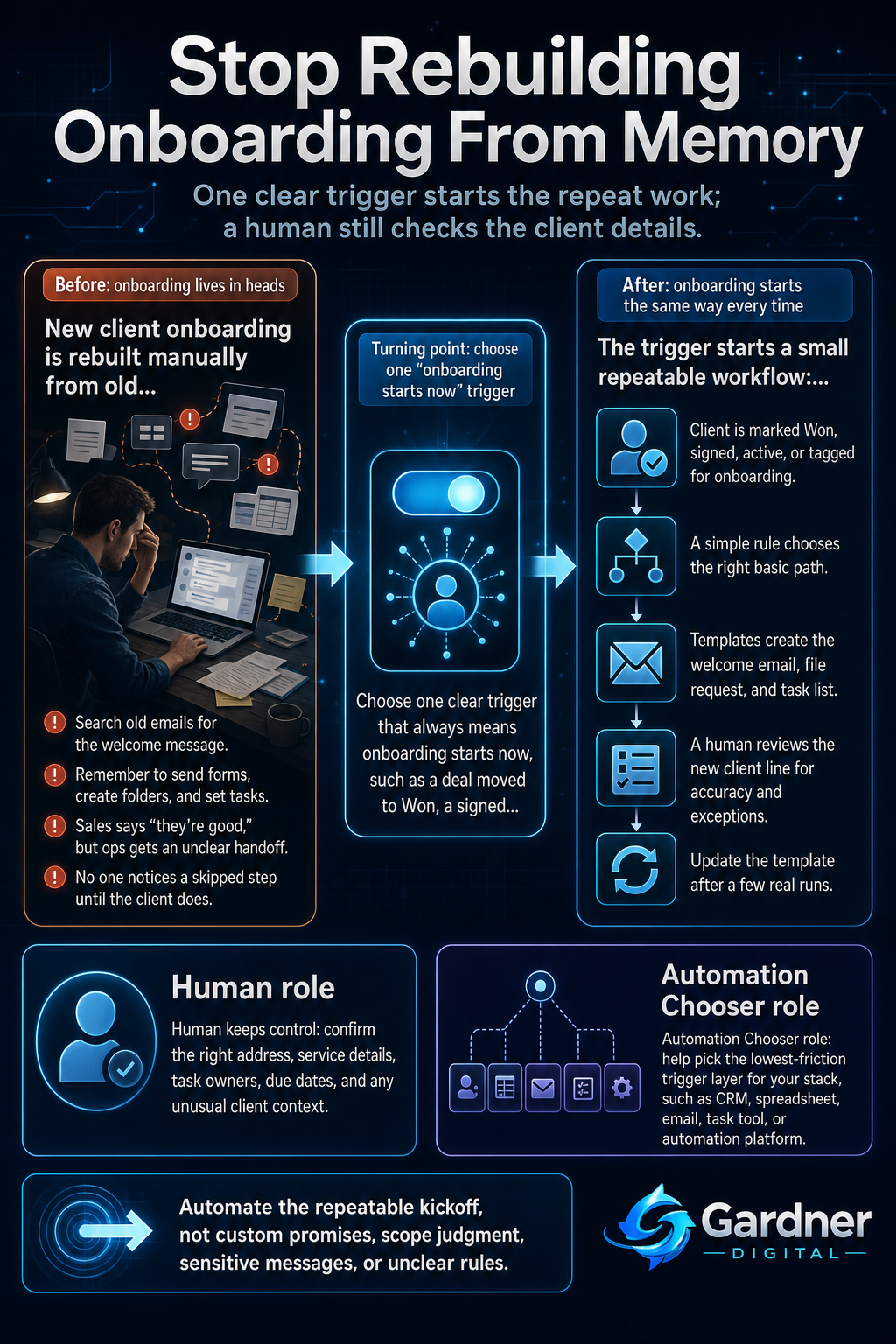
Only after that workflow is clear do you bring in a tool to automate the trigger step. Automation Chooser helps you decide which layer to start with (CRM, email tool, task tool, or automation platform), but the real leverage comes from designing the path before you wire anything up.
From closed deal to consistent onboarding
What this problem looks like
In most small teams, onboarding is just “whatever the last client got.” You search your email for a previous welcome message, forward an old intake form, and hope you remember the Google Drive folder structure. Half the instructions live in someone’s head, the rest in scattered meeting notes, Slack messages, and random docs.
The result: some clients get all the info on day one, others wait a week. Files come in over email, Slack, and text. You open your task board and realize there’s no card for that brand-new client because you never created one. When everyone is busy, the only “system” is who happens to remember the next step.
What changes when onboarding stops living in people’s heads
Before
- You dig through old emails to find a welcome template every time a client signs.
- Tasks to set up folders, dashboards, or recurring meetings are created only when you remember them.
After
- Marking a deal as Won always triggers the same welcome email and intake form automatically.
- A standard set of onboarding tasks appears on your task board for every new client without manual copy-paste.
Why the workflow breaks
This workflow breaks for a few simple reasons:
- No single capture point. New clients show up in email, DMs, spreadsheets, and calls. There’s no one place where “this client is now active” lives.
- Missing owner. Nobody is clearly responsible for kicking off onboarding, so everyone assumes someone else did it.
- Weak handoff. Sales says “they’re good to go,” but operations never gets a clean package of what was sold, what’s needed, and when to start.
- No reliable reminder. If a step is skipped—like setting a recurring review in Google Calendar—there’s nothing that catches it before the client notices.
- Process is in people’s heads. The path exists, but it’s stored in memory, old meeting notes, and a private checklist instead of one visible flow everyone uses.
Step-by-step fix
- Choose one clear trigger. Decide exactly what counts as “onboarding starts now.” For example: moving a deal to Won in your CRM, adding a row to a "Active Clients" spreadsheet, or tagging an email thread with "Onboarding".
- Write the bare-minimum onboarding checklist. List the 5–10 things that must always happen: welcome email, intake form link, shared folder creation, task board setup, first meeting scheduled, and internal notes documented.
- Turn the checklist into one repeatable template. Create a standard task template in your task board and save your welcome email and file request as templates in your email tool.
- Pick the lowest-friction automation for the trigger. Use a simple connection—like your CRM’s built-in automation, an email rule, or a basic automation platform—to watch for the trigger and create the tasks/emails from your templates. This is where a tool like Automation Chooser helps you decide which layer to start with given your stack.
- Set a daily review checkpoint. Add a recurring calendar block or task to quickly scan new clients: confirm the tasks, folders, and emails exist; fix any that didn’t fire as expected.
- Adjust only after a few runs. Once you’ve onboarded a handful of clients through this path, update the template instead of inventing new one-off workflows.
First manual control point
The first control point is a human review of each new client after the trigger fires. Once a day, someone should open the CRM or spreadsheet, look at the list of new “Won” clients, and quickly check three things:
- Did the welcome email actually send to the right address with the right service details?
- Do the onboarding tasks exist on the task board and have a clear owner and due dates?
- Is anything unusual about this client (custom scope, special timing, sensitive context) that means the standard flow needs a tweak?
Nothing here should take more than a few minutes, but this is where you catch bad data, odd cases, or misfired automations before the client feels the gap.
Where the tool fits
| Workflow problem | Tool role | Human decision |
|---|---|---|
| New clients are tracked in different places and onboarding doesn’t start consistently. | Automation Chooser helps you pick the best trigger source (CRM, spreadsheet, form, or email) to watch for “client became active.” | Decide which system is the source of truth for new clients and commit to using it. |
| You manually copy the same welcome email, intake form, and instructions for every client. | Automation Chooser points you toward tools that can send templated emails or sequences when the trigger fires. | Write the actual templates, including what you promise, timelines, and tone that fits your brand. |
| Operational tasks like folder setup and meeting scheduling are easy to forget. | Automation Chooser guides you to light automations that create standard tasks or calendar events when a client is marked as onboarding. | Choose which tasks must always be automated and which stay manual because they need judgment or client input. |
What to automate now vs. what to keep human
Automate now
- Sending a standard welcome email when a deal moves to Won in your CRM or client spreadsheet.
- Creating a fixed set of onboarding tasks on your task board for every new client.
Do not automate yet
- Custom promises or scope details that came up in sales calls and need clear human wording.
- Complex client segmentation rules where even your team still argues about which path a client belongs in.
What not to automate yet
Leave anything that still relies on judgment or unstable rules manual for now. For example, if you offer three different service tiers and your team often adjusts the package mid-call, do not yet try to auto-assign a complex “tier-based” onboarding path. Instead, let a human quickly tag the right path after reviewing the signed agreement.
Also keep high-sensitivity communication—like outlining boundaries, clarifying scope changes, or handling delayed payments—human-written. You can use templates as a starting point, but a person should choose the final message and send it.
When to use this workflow
This approach works best when:
- You repeat the same onboarding steps for most clients, even if the details vary slightly.
- You track new clients in at least one consistent place already (CRM, spreadsheet, or project tool).
- Your team is small and nobody has time to manage a huge automation project, but everyone feels the drag of manual onboarding.
- You want a low-risk starting point where you can still see and correct what the automation does.
When not to use it
This is not the right first move if:
- Every engagement is truly bespoke and you rarely repeat the same steps twice.
- You do not yet have a reliable way to know when a client is officially “signed” or “active.”
- Your internal process is still changing week to week, and you haven’t agreed on a basic checklist.
- You’re hoping automation will fix unclear offers, messy scope, or misaligned expectations from sales—that needs process and communication work first.
FAQ
How simple can my first onboarding automation be?
It can be as simple as one rule: when a client row is added to your "Active Clients" spreadsheet, send a templated welcome email and create a starter task list. You do not need a full CRM or complex workflow engine to start; the key is that the trigger is clear and the steps are written down.
What if I onboard different types of clients?
Start with the most common type. Build a basic path for that one segment and run it a few times. Once it’s stable, add a second path, using a simple rule like a column in your spreadsheet or a field in your CRM to decide which template to use. Don’t try to cover every edge case on day one.
Where does Automation Chooser actually help?
Automation Chooser helps you pick the first layer of tooling to support this workflow based on where your client data already lives and how comfortable your team is with automation. Instead of guessing between a CRM automation, an email platform, an automation tool like n8n, or just staying in spreadsheets, you answer a few practical questions and get a suggested starting point that fits your existing stack.
How do I keep control if something goes wrong?
Keep your daily or weekly review block, and make sure every automated action leaves a visible trace—tasks on a board, emails in a sent folder, calendar events in Google Calendar. If you spot problems, turn the automation off, adjust the template or rule, and try again on the next client. You’re staying in charge; the automation is just doing the boring repeat work.