
It is 8:45 on Monday and you open Google Calendar: a solid rainbow from 9:00 to 17:30. "Quick sync" with sales, weekly standup, ad-hoc project check-ins, one-on-ones squeezed between, with 15-minute gaps scattered through the day. There is nothing on the calendar for the board deck you owe Friday, the proposal you promised a client, or the performance reviews due next week. Those live on a to-do list and in Slack threads you told yourself you would get back to "tonight."
Direct answer
The issue is not that you are lazy or bad at time management. The problem is a calendar that only tracks meetings instead of all of your real work. The workflow fix is to treat your calendar as the plan for your week: block recurring focus time for deep work and routine tasks, then let a scheduling tool rearrange the flexible pieces around fixed meetings instead of you doing calendar Tetris at 22:00.
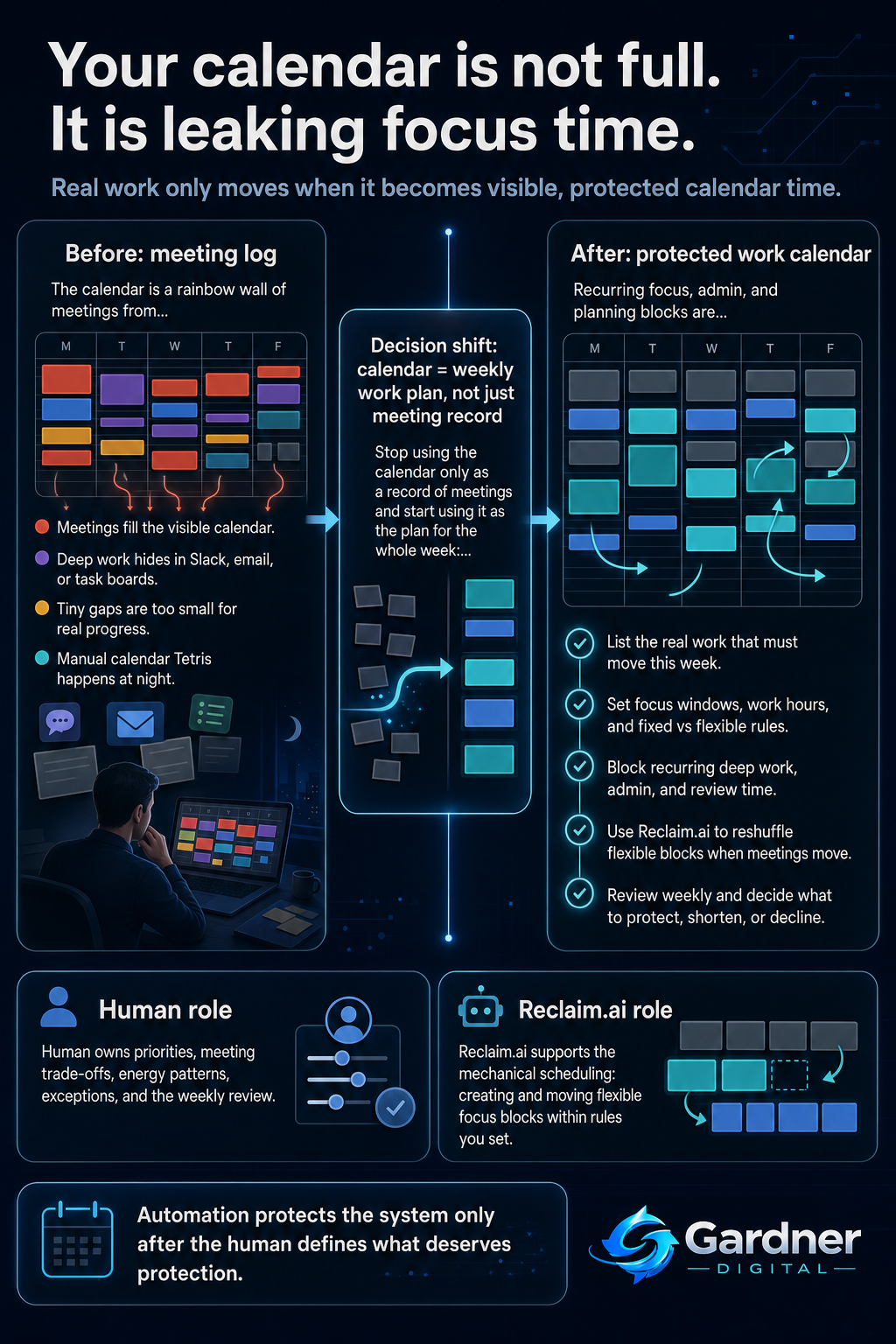
From rainbow calendar to protected focus time
What this problem looks like
Day to day, the mess is subtle. Your calendar looks impressive: colour-coded meetings from different teams, external calls, recurring status updates. People see you as busy and responsive. But the actual work that moves the needle lives somewhere else:
- Important tasks sit in a task board, notebook, or email stars with no time reserved to do them.
- You answer Slack messages during meetings because there is no other time to keep up.
- Decks, proposals, and reviews get written late at night when the pings finally stop.
- Sunday afternoon becomes "catch-up" time for reading docs and leaving comments on meeting notes.
Your week becomes reactive: meetings and Slack set the pace, and the only guaranteed focus time is after 20:00 when everyone else logs off.
What changes when deep work lives on the calendar
Before
- Google Calendar shows back-to-back meetings with tiny gaps and no focus blocks.
- Client proposals, strategy docs, and performance reviews spill into evenings and weekends.
After
- Recurring focus blocks appear on the calendar and move around meetings instead of being deleted.
- Most deep work is done during work hours, with nights used for rest or true exceptions.
Why the workflow breaks
The root cause is treating the calendar as a meeting log rather than a realistic plan for the week. A few specific failure points show up:
- Unclear capture of solo work: Important tasks live in email, Slack, or a project tool, but never turn into actual time on the calendar.
- No owner for protecting focus: When someone asks for a meeting, there is no rule or person responsible for checking what gets displaced.
- Meeting bias: In most teams, "urgent meeting" always beats "quiet work" because only the meeting is visible.
- Manual rearranging is exhausting: You try to fix things by dragging blocks around the calendar late at night, but there is no consistent system, so the pattern repeats.
Without a clear workflow, your calendar ends up managing you. Deep work loses because it is invisible and unprotected.
Step-by-step fix
- List your non-meeting work for a typical week. Include writing, analysis, planning, reviews, one-on-one prep, and admin like email and approvals. Be honest about how many hours each actually takes.
- Define time rules and ownership. Decide your ideal focus windows (for example, 9:30–11:30 and 14:00–16:00 on certain days), how many hours of deep work you need, and which kinds of work are flexible versus fixed. You own enforcing these rules for your calendar.
- Block recurring focus and admin time in your calendar. Create recurring events in Google Calendar (or your primary calendar) for deep work, admin, and regular internal work blocks. Give them clear names like "Deep work – client proposals" or "Weekly review and planning."
- Introduce Reclaim.ai to protect and adjust those blocks. Configure Reclaim.ai to create and manage focus time based on your priorities and work hours, letting it automatically move flexible blocks when new meetings are scheduled instead of simply cancelling them.
- Run a weekly calendar review. Once a week, look at the upcoming seven days: check that deep work blocks still exist, that key tasks have a home, and adjust any that clearly will not work. Confirm that every major task has time assigned, not just a line on a to-do list.
First manual control point
Before you lean on automation, you need one simple manual checkpoint: a weekly 15–20 minute review where you look at your calendar and ask, "Does every critical piece of work this week have a real block of time attached?" During this review you:
- Scan email, Slack, and your task board for big commitments and make sure each one has a calendar block.
- Decide which meetings are truly needed and which can be declined or shortened to protect focus time.
- Adjust any Reclaim.ai focus blocks that are misaligned with your energy patterns or deadlines.
This manual control point keeps you in charge of priorities while letting the tool handle the mechanical shuffling.
Where the tool fits
| Workflow problem | Tool role | Human decision |
|---|---|---|
| Deep work never makes it onto the calendar, so meetings always win. | Reclaim.ai can create focus time blocks in your calendar based on your priorities and availability. | Choose which tasks deserve protected focus time and how many hours they need this week. |
| New meetings wipe out the few focus blocks you scheduled. | Reclaim.ai can reschedule flexible focus blocks around fixed meetings instead of simply deleting them. | Decide which blocks are flexible, which are non-negotiable, and when a meeting request should be declined. |
| Constant manual calendar Tetris to keep your week workable. | Reclaim.ai automates routine adjustments to block placement within rules you set. | Set the rules: working hours, max meeting load, and acceptable times for deep work. |
Decide where to let automation help and where to stay hands-on
Automate now
- Scheduling recurring focus blocks for tasks that happen every week, like writing reports or planning.
- Rescheduling flexible focus time when new meetings appear, within work hours you have already defined.
Do not automate yet
- Big trade-offs like cancelling a key stakeholder meeting to protect focus time on a minor task.
- Prioritisation for one-off, high-stakes projects where you still need to think through the timeline manually.
What not to automate yet
Some decisions are still better made by you, especially while you are learning this workflow. Examples:
- Which meetings you decline or shorten. A tool can shuffle blocks, but it cannot understand the political cost of skipping a leadership sync or a client touchpoint.
- How to handle crunch weeks. When a product launch or funding round creates genuine overload, you still need to manually adjust expectations, renegotiate deadlines, and reassign work, not just squeeze more blocks into the calendar.
- Energy management. Only you know when you do your best thinking, so you should still decide which hours are reserved for your hardest work.
When to use this workflow
This approach is a strong fit when:
- Your calendar is packed with meetings and you regularly push real work into nights or weekends.
- You manage people or projects and need uninterrupted time for reviews, planning, and decision-making.
- You already track tasks in tools like a task board, Notion, or email folders, but they rarely turn into scheduled time.
- You mostly work within regular business hours and want to protect them rather than expand into personal time.
When not to use it
This is not the first move when:
- Your workload is genuinely unpredictable shift work where you have almost no control over incoming tasks.
- You are in a role with very few meetings and plenty of open time; your issue may be prioritisation, not scheduling.
- Your team has not agreed on any meeting norms, so everything is still scheduled last-minute without context. In that case, start by setting some basic rules about meeting length, purpose, and required prep.
- Your calendar is shared and heavily controlled by someone else (for example, a central scheduling desk) and you lack permission to block focus time.
FAQ
How many hours of focus time should I block each week?
There is no universal number, but a practical starting point for a meeting-heavy role is to reserve at least a few multi-hour blocks during the week for deep work, plus smaller blocks for admin. Track how often you actually use those blocks for meaningful work and adjust up or down based on what lets you keep up with your core responsibilities without relying on nights.
What if people keep booking over my focus time?
First, make sure your focus blocks are clearly labelled and, where appropriate, marked as busy so they show up as unavailable. Then have a direct conversation with your team or manager explaining that these blocks exist to protect work that benefits them: better decisions, cleaner documents, and fewer last-minute emergencies. Use your weekly review to decide which exceptions are acceptable and where you need to push back.
Can I use this workflow without Reclaim.ai?
Yes. You can manually create recurring focus blocks on your calendar and move them yourself when things change. The trade-off is that you will spend more time rearranging your week. Reclaim.ai becomes useful once you have clear rules but are tired of doing the shuffling by hand, especially in a calendar with frequent changes.
How do I connect tasks from my task board to calendar blocks?
A simple approach is to pair a weekly planning session with your task system. Look at your task board, choose a small number of important tasks for the week, and then assign each one to a specific focus block by naming the calendar event accordingly. You can refine this over time with templates or integrations, but the key is that every major task has a visible home on the calendar.
What if my manager expects instant replies in Slack during meetings?
If constant responsiveness is part of your culture, start small. Pick at least one or two focus blocks where you explicitly turn off Slack notifications and let your manager know what you are doing and why. Show that this results in higher-quality work or fewer follow-up questions. Often, once leaders see the benefits, they become more willing to protect those blocks.