
It is 3:15 p.m. and your day looks full on paper—back-to-back Zooms, a few color-coded "focus" blocks, and a lunch that turned into email catch-up—but the proposal you promised a client for tomorrow is still a rough outline in your notes. Your calendar protected every meeting invite, yet the work that actually pays the invoice never had a real place to live.
Direct answer
The fix is to treat client work, deep work, and follow-up as first-class calendar events with clear rules, not as whatever is left after meetings. You set a simple workflow: define your non-negotiable work blocks for the week, give them realistic durations, decide which ones can move and which cannot, and then let a calendar tool help place and defend those blocks around the meetings you truly cannot move. Reclaim.ai can then automate the "finding and defending" part, but only after you are clear on what tasks deserve that protection.
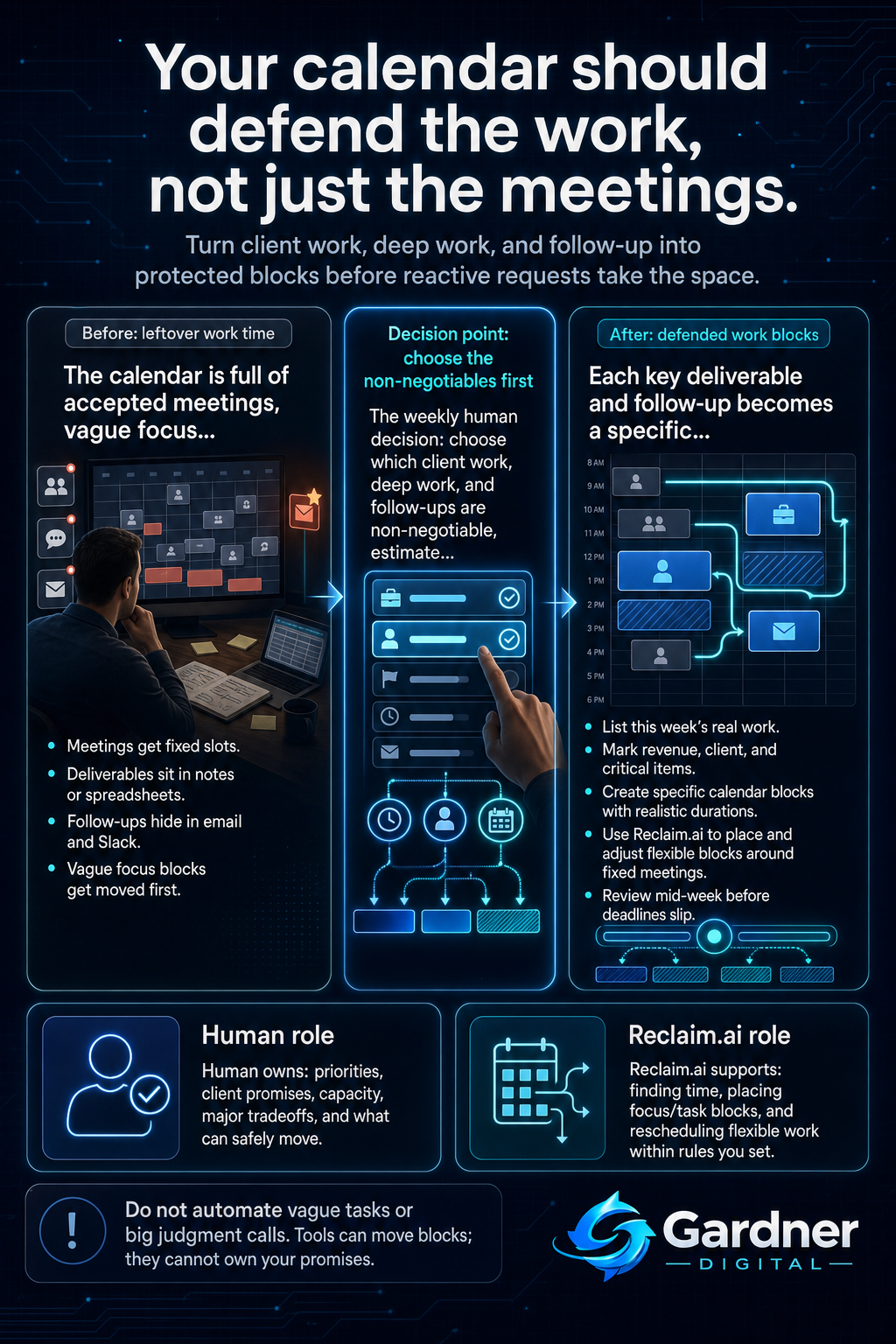
From vague intentions to defended work blocks
What this problem looks like
The pattern is familiar: your Google Calendar is a rainbow of meetings, a few tentative focus blocks, and a lot of white space that looks usable but never actually gets used for deep work. Sales calls run long, someone pings you in Slack for a “quick” favor, and that open hour you had marked for building a client report turns into replies and small tasks.
Meeting notes pile up in a document or notebook, but they never become specific calendar events. Follow-ups live as starred emails or a mental list, so they only get done at 9:30 p.m. when everything else is quiet. You feel busy all day, yet your spreadsheet of deliverables and your task board show work slipping week after week.
What changes when real work gets its own space
Before
- Client deliverables are tracked in a spreadsheet, but there are no calendar blocks tied to them.
- Follow-up lives in email stars and Slack reminders, squeezed into leftover time after meetings.
After
- Each key deliverable becomes a series of protected calendar events sized to the real work.
- Follow-up and deep work have recurring blocks that automatically land in usable time, not just gaps.
Why the workflow breaks
Calendars are designed to protect meetings by default: if someone sends you an invite and you accept, it gets a fixed slot, often with a clear owner and purpose. The work that comes out of those meetings is fuzzier. It might sit in meeting notes, a task board, or a shared document, and there is no automatic bridge between those places and your calendar.
Without a simple rule for turning tasks into time, the calendar ends up protecting the loudest events, not the most valuable work. Client projects, invoicing, planning, and thoughtful follow-up are quiet—they do not send you new invites every hour—so they lose the fight against last-minute calls and reactive requests. The root causes are unclear capture ("I’ll remember to do that"), missing owners (no one is personally responsible for the block), and no recurring review of whether calendar time still matches the actual workload.
Step-by-step fix
- List the real work for this week. In a doc, spreadsheet, or task board, write out your concrete client deliverables, deep work items, and follow-ups that must happen this week. Include rough time estimates.
- Decide what is non-negotiable. Mark which items directly tie to revenue, client promises, or critical progress. These get protected calendar time. Decide owner (often you) and whether they can move or must stay fixed once scheduled.
- Create calendar events that match the work. Instead of one vague "focus" block, create a few specific events like "Draft proposal for Client A" or "Follow-up on last week’s demos" with realistic durations. Set them during your best focus hours where possible.
- Use Reclaim.ai to place and defend the blocks. Once you have clear tasks and rules, configure Reclaim.ai to create smart focus time and task time from your list, allowing it to automatically find slots around meetings and to reschedule when something truly urgent interrupts. Keep the priorities aligned with the non-negotiable list you already defined.
- Run a mid-week review. Twice a week, quickly scan your calendar against your task list. Check that each must-ship deliverable still has enough protected time before its deadline, and adjust priorities or meeting acceptance if it does not.
First manual control point
The key control point is the weekly decision about what truly matters. Before any automation runs, you should personally decide which client projects, internal initiatives, or follow-ups deserve protected time, how much time they need, and what can be safely pushed if the week gets crowded. This is where you look at the reality of your sales pipeline, existing commitments, and capacity—not just what the calendar says is free—and choose what actually gets shipped.
If you skip this step and let automation schedule every task equally, you risk giving prime focus time to low-impact work while critical deliverables still end up after hours.
Where the tool fits
| Workflow problem | Tool role | Human decision |
|---|---|---|
| Meetings and ad-hoc calls crowd out planned deep work. | Reclaim.ai turns your focus tasks into calendar events and automatically tucks them into available time around fixed meetings. | Decide which tasks qualify as focus work and how many hours per day you are willing to reserve. |
| Manual time blocking takes too long and falls apart after the first emergency. | Reclaim.ai can reschedule flexible work blocks when new meetings land, so you do not have to drag and drop every event. | Set boundaries on how late blocks can move, which ones are flexible, and which ones are truly fixed. |
| Follow-ups and smaller client tasks hide in email and never hit the calendar. | Reclaim.ai can sync tasks from your task list into time on your calendar based on rules you define. | Choose which task lists should sync, and which follow-ups still need manual judgment before they earn calendar time. |
What to schedule automatically and what to keep under manual review
Automate now
- Recurring focus time for ongoing client work that always needs a few hours each week.
- Placement and gentle rescheduling of flexible work blocks around fixed meetings in your calendar.
Do not automate yet
- Decisions about which new client to prioritize when capacity is tight.
- Major deadline shifts or commitments you have already communicated to clients or your team.
What not to automate yet
Do not hand off big judgment calls to automation. Choosing which proposal to delay, whether to accept a last-minute meeting that will eat into preparation time, or how to balance an urgent internal project against a long-standing client still needs a human look. Tools can move blocks, but they cannot own your promises.
Also avoid auto-scheduling vague tasks like "work on business" or "catch up" until you have broken them into clear, time-bound pieces. Otherwise, you will fill the calendar with blocks that are easy to move or skip because they do not feel concrete.
When to use this workflow
This approach works well if your days are shaped by external requests—client calls, partner meetings, internal standups—but your real value comes from focused work done outside those meetings. Solo consultants, small agencies, and lean teams that live in Google Calendar and email usually see the most benefit.
If you regularly end the week with important work pushed into nights and weekends, or you catch yourself saying "next week will be quieter" every Friday, this workflow is a good fit.
When not to use it
If your work is mostly reactive support or real-time operations where tasks must be handled as they arrive, heavy calendar blocking may not help and might even create noise. In those environments, a clear queue and response-time rules matter more than protecting long focus blocks.
It is also not the right first move if your team does not yet agree on priorities or basic capacity. In that case, start by clarifying what matters most and who owns which outcomes before you worry about how the calendar represents them.
FAQ
How much of my week should be protected for deep work?
There is no universal number, but a useful starting point is to protect a few hours on at least three days of the week for your highest-impact work. Look at your existing calendar: if meetings already fill most afternoons, you might reserve mid-mornings for client work and let a tool like Reclaim.ai defend that time as best it can around fixed commitments.
What if an urgent meeting needs to land on top of a protected block?
Some meetings really are more important than the block they replace. When that happens, treat it as a conscious trade, not an accident. Allow the tool to reschedule the block within the rules you have set, and during your next review, confirm that there is still enough time left before the relevant deadline. If not, you may need to say no to a different request or shift a commitment.
How is this different from just color-coding my calendar?
Color-coding only labels what is already on your calendar; it does not guarantee that the right work shows up there in the first place. This workflow starts by deciding which work deserves time, turns that into specific events, and then uses automation to keep those events alive when new meetings arrive. The goal is a calendar that reflects your real priorities, not just a colorful view of everyone else’s requests.